
In Zoho Projects, Your Job, Your Quote and Your Delivery Plan Are the Same Thing.
Build work at phase, task, and subtask level, see committed and tentative demand together, and validate capacity before the proposal goes out.
Lumen's Quote for Zoho Projects makes that plan visible and validated at phase, task, and subtask level, checked in real time against every live project and every other quote in your pipeline.
Zoho Projects Quoting Built for Agency Resource Scheduling
- Committed capacity is work already alive in Zoho Projects. It is scheduled, assigned, and protected.
- Tentative capacity is work you have quoted but not yet won. It is a real demand that is not yet confirmed.
- Stop double-promising the same people across multiple proposals without realising it.
Zoho Projects Quoting and Capacity Planning in One Plugin
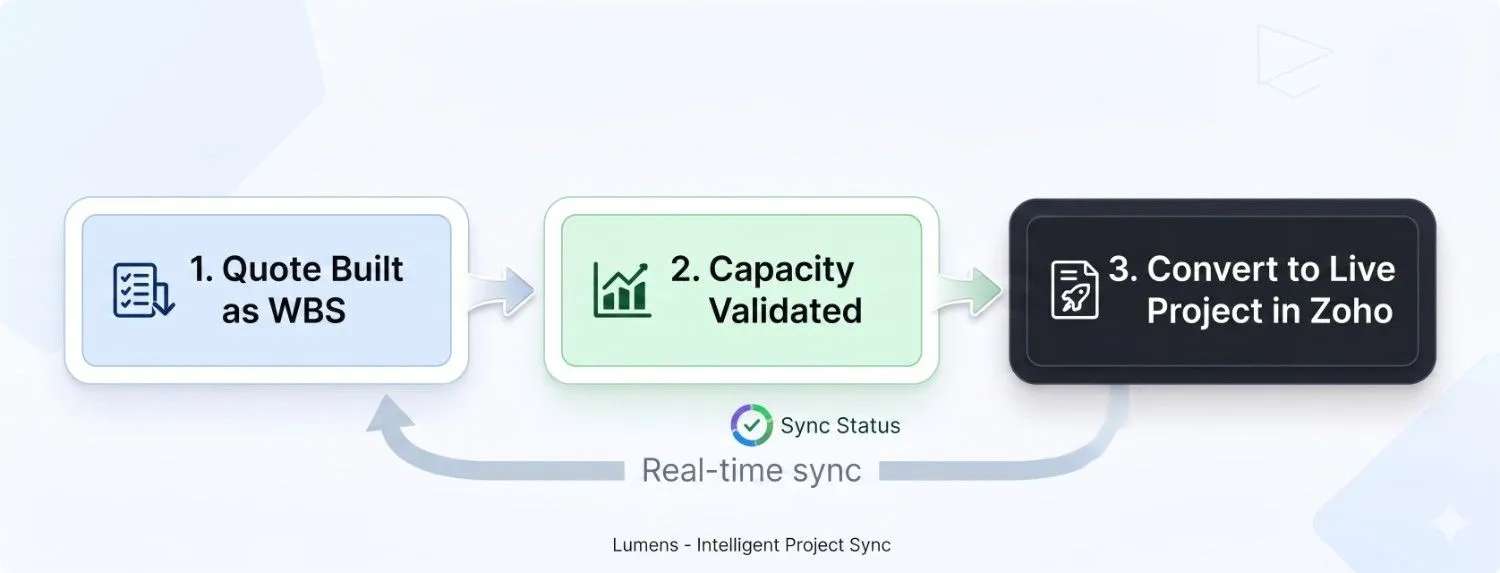
Building a quote and building a delivery plan should be the same act. With Lumen's Quote for Zoho Projects, they are.
Major stages
Phase is the major stages of the engagement, for example Discovery, Design, Build, QA, and Launch. You build the quote line by line at phase, task, and subtask levels.
Key deliverables
Task is the key deliverables within each phase, for example UX Design, Frontend Development, and Content Migration. Each needs a named owner, a skill level, and dates.
Specific units
Subtask is the specific units of work within each task, for example Wireframes, Prototype, and User Testing. This is where capacity risk becomes visible.
Automatic summary
Hours, start dates, and end dates roll up automatically. As you build tasks and subtasks, the phase summary updates live, showing total hours, earliest start, and latest end.
Lumen's Quote separates capacity into two states
That distinction is what stops you from double-promising the same people across multiple proposals without realising it.
Work already alive in Zoho Projects
Committed capacity is work already alive in Zoho Projects. It is scheduled, assigned, and protected. It is visible across the portfolio as fixed demand that cannot be easily moved without impact.
Work you have quoted but not yet won
Tentative capacity is work you have quoted but not yet won. It is a real demand that is not yet confirmed, and it needs to be visible when you are making resourcing decisions, because if two or three tentative jobs convert in the same week, you have a constraint you did not see coming.
Why Quoting and Project Planning Fail Without Task-Level Visibility
A rough quote can win work, but then someone has to rebuild the delivery plan and discover the conflicts all over again.
Rebuilding the plan
Someone opens Zoho Projects and starts rebuilding the plan, re-entering phases, tasks, hours, and assignments that were already worked out during quoting but never formally structured. Halfway through that rebuild, the first conflict appears.
Hidden collisions
The Senior Developer is already committed elsewhere in week 3. The QA resource has leave. Two projects are competing for the same Designer. The dates in the quote are no longer achievable. That is not a delivery failure. It is a quoting failure.
Shared view of capacity
It happens because the quote and the plan were two separate things built at two separate times without a shared view of capacity. Lumen's Quote makes them the same thing, validated at the moment of quoting.
How Lumen's Quote Structures Your Zoho Projects Delivery Plan
The cascade view lets you plan deeply without forcing the whole team to see every detail.
Start at the top
Define the phase and the major commercial frame of the engagement. Phase is the major stages of the engagement, for example Discovery, Design, Build, QA, and Launch.
Add tasks
Break the phase into deliverables with owners, dependency logic, and dates. Task is the key deliverables within each phase, for example UX Design and Frontend Development.
Drill into subtasks
Capture the detailed units of work where capacity risk becomes visible. For example Wireframes, Prototype, and User Testing within each task.
Watch the roll-up
Hours, start dates, and end dates roll up automatically at every level. You always have an accurate phase-level view no matter how deep the detail goes.
Real-Time Resource and Capacity Checking in Zoho Projects
The right skill level has to be free in the right week, across both live projects and quoted pipeline work.
Availability is checked line by line
At the moment of quoting you can see whether the right skill level is genuinely free in the weeks this work lands, whether adding this job creates a conflict with an existing project, and whether other quotes in your pipeline, if they convert, would consume the same capacity.
Every live project and every quoted job counts
You do not finish the quote and then run a capacity check. The capacity check happens as you build, line by line. If a conflict exists, you see it before the proposal goes out, not after the client has signed.
What You Can Promise Clients With Real Capacity Data Behind You
The structure makes the promise more credible because it is backed by visibility, not guesswork.
Know whether the capacity exists
Before the proposal goes out, you know whether the capacity exists at the right skill level in the right weeks, without breaking anything already committed.
See the collision risk early
You can see what your capacity looks like if multiple quotes convert, so you are never blindsided by three clients signing in the same week.
Sell with precision
When your portfolio has real availability, you can tell sales exactly which skill levels are free and in which weeks, specific enough to put in a proposal.
The value is the removal of duplicate work.
One structured plan
Every quote becomes a fully structured delivery plan at phase, task, and subtask level.
Visible capacity
Real-time capacity visibility at task and subtask level across your entire portfolio.
Defined dependencies
Dependencies are defined from the first line item so the schedule is realistic from the start.
Direct conversion
Direct conversion into Zoho Projects with no re-entry or hidden conflicts when the job is won.
Zoho Projects Quoting and Capacity Planning FAQs
Accurate capacity decisions need a clean baseline. This includes defined skills, roles, and levels across your team, maintained resource calendars, estimates at task and subtask levels for constraint roles, and dependency discipline. Lumen sets this up during onboarding so it becomes part of your workflow.
It is a web app that runs in a tab inside both Zoho Projects and Zoho CRM. Your team builds jobs and quotes within the plugin, and winning jobs convert directly into Zoho Projects with no migration or re-entry required.
Yes, you will build quotes at the phase, task, and subtask level rather than using rough phase-level estimates. This enables real-time capacity checking and eliminates the need to rebuild the plan after a job is won.
Quoted work is visible in the capacity view as "tentative demand." It is not committed in Zoho Projects until converted, allowing you to see potential collisions between unconverted quotes and committed capacity.
During onboarding, Lumen defines your roles, skill types, and levels. This ensures every task and subtask is assigned to the correct resource profile, making capacity checks meaningful.
Yes, that is its primary purpose. The real-time capacity check looks across the full portfolio, including every live project and every quote in the pipeline simultaneously.
The "cascade view" is flexible. You only build to the depth the project requires; not every job needs full subtask detail.
Every quote should be a promise you know you can keep.
If you want the team to stop rebuilding plans and start delivering them, book the consultation and we will map the implementation path for your situation.